
Insights
How to Scrape Amazon Product Data: Anti-Bot Reality Check
Oct
Every week someone asks for “all Amazon prices in category X, daily.” It is a reasonable business request and one of the harder engineering ones. This is not a copy-paste scraper tutorial. It is what you need to know before you write one, or before you pay someone who claims theirs never gets blocked.
Key takeaways
- “The Amazon price” is usually the featured offer (Buy Box) for one delivery location. Record the seller, condition and location next to it, or the number is not comparable.
- Three different problems produce similar-looking failures: a retired API (403), a search depth cap (results stop at page 7 or 20), and anti-bot blocking (Robot Check pages, 503s). Each has a different fix.
- In our October 2026 check, an Amazon product page was about 2 MB of server HTML with no JSON-LD product markup at all.
- Responsible collection means fewer, better requests, explicit block detection and validation, not more proxies.
- Below a few thousand ASINs, a managed provider or dataset is usually cheaper than building and maintaining your own.
What “Amazon product data” actually contains
An ASIN page looks like one product with one price. Underneath it is a catalog record shared by every seller, plus a list of offers competing for the Buy Box. The price most tools report is the featured offer for the visitor’s delivery location at that moment.
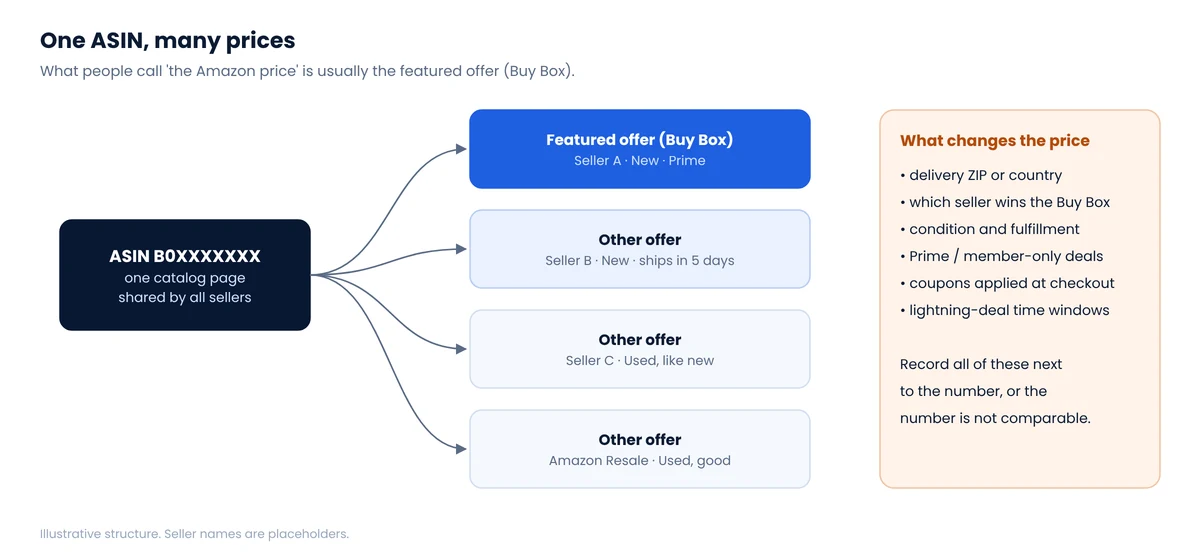
The fields teams usually want, and where they come from:
| Field | Where it lives on the page | Watch out for |
|---|---|---|
| Title, brand | Product title block, byline | Brand line is sometimes “Visit the X Store” |
| Price (featured offer) | Price block, including hidden “offscreen” text | Currency and format depend on delivery location |
| List / was price | Strikethrough near the price | Not always present; “typical price” is a different concept |
| Seller and fulfillment | Buy box “Ships from / Sold by” | Changes during the day as offers compete |
| Rating, review count | Review summary | Counts are shared across variations |
| Variations | Inline JavaScript (“twister” data) | Each size or color can be its own ASIN with its own price |
| Availability | Availability message | “Usually ships in…” vs in stock vs unavailable for your location |
What we saw on an Amazon product page in October 2026
We opened amazon.com product pages from a browser in Europe, without signing in, to see what a scraper with a non-US exit IP would receive. Three things stood out.
- Size. The server HTML for a single product page was about 1,990 KB before images and scripts. At residential proxy prices, that weight matters; we compare page weights across retailers in Where e-commerce data actually lives.
- No structured product data. The page had zero JSON-LD blocks. Unlike many retailers, there is no tidy schema.org
Productobject to fall back on. - Location rewrote the price. The header read “Deliver to Czech Republic,” prices were shown in Czech koruna, and the page carried a “cannot be shipped to your selected delivery location” notice. The hidden price text came back as
CZK2,40482: converted currency, with the decimal point dropped from the string. A naive parser would record 240,482.
None of this is a block. The page loaded with HTTP 200 and parsed cleanly, and the number is still wrong for a US price comparison. That is the most common Amazon data-quality bug we see, and it is why we wrote a separate guide on zip-code pricing.
Three Amazon failures that look alike
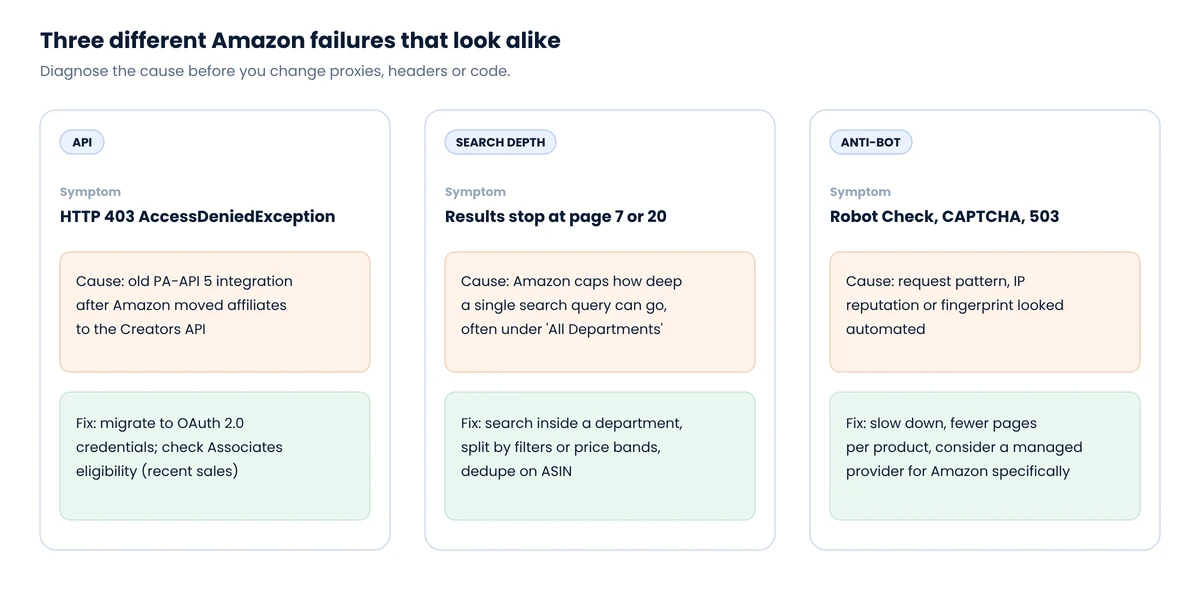
1. The API returns 403
If your “scraper” is actually an integration with Amazon’s affiliate API, the 2026 change is the likely cause. Amazon deprecated PA-API 5, and calls to it now return 403 Forbidden with AccessDeniedException. The replacement, the Creators API, uses OAuth 2.0 credentials and has its own eligibility rules. We cover that change in Web scraping vs official APIs.
2. Search results stop early
Amazon does not let one search query page indefinitely. Web Scraper’s documentation notes that Amazon sometimes limits search pagination to 7 or 20 pages, roughly 300 product URLs, typically under “All Departments.” More pages of the same query will not help; narrower queries will. Searching inside a department, splitting by brand or price band, and deduplicating on ASIN usually recovers far more products. The general technique is in our guide to pagination limits on major retailers.
3. Anti-bot blocking
The classic signature is the “Robot Check” page, a CAPTCHA, or a page containing the line “To discuss automated access to Amazon data please contact api-services-support@amazon.com.” HTTP 503 responses and pages that load without a price block are softer variants. They mean your request pattern, IP reputation or browser fingerprint looked automated.
Context helps set expectations. Thales/Imperva’s 2026 Bad Bot Report says bots now make up more than half of web traffic, and that roughly 40% of traffic is classified as malicious bots. Radware described a single large e-commerce customer that detected and blocked more than 3 billion price-scraping events in 30 days of a holiday season. Those are security vendors’ measurements of their own customers, not a census of the internet, but they explain why retailers invest so heavily in detection. You are not the only one asking.
Detect failures explicitly, before you parse
The worst Amazon scraper is not one that gets blocked. It is one that gets a block page, extracts nothing or the wrong thing, and writes it to your database as a price. Classify every response first. A minimal version:
Python: classify an Amazon product responseimport re
BLOCK_MARKERS = (
"api-services-support@amazon.com", # robot check page
"Enter the characters you see below",
"/errors/validateCaptcha",
)
def classify(asin: str, status: int, html: str) -> str:
if status == 503 or status == 429:
return "throttled"
if status != 200:
return f"http_{status}"
if any(m in html for m in BLOCK_MARKERS):
return "blocked"
if asin not in html:
return "wrong_page" # redirect, dog page, other ASIN
if "cannot be shipped to your selected delivery location" in html:
return "wrong_location" # price is not a US shelf price
price = re.search(r'class="a-offscreen">\s*([^<]+)<', html)
if not price:
return "no_price" # unavailable, or layout changed
if not price.group(1).strip().startswith("$"):
return "wrong_currency"
return "ok"
Count each label per run. A rising blocked share means slow down. A rising no_price share with no blocks usually means the layout changed. Anything other than ok should never reach the price table. This is the same five-layer idea we use for every retailer, described in the Walmart guide: not blocked is not the same as correct.
What responsible Amazon collection looks like
We won’t publish evasion recipes, and you should be wary of anyone whose main selling point is beating Amazon’s defenses. What reliably works is boring:
- Ask for less. One product page per ASIN per cycle gives you price, seller, rating and availability. Don’t crawl review pages or every variation unless you need them.
- Set location on purpose. Decide which US ZIP your prices represent, set it, and store it with every observation.
- Space requests out. Spread a daily run across the day instead of bursting it at midnight. Cache pages that don’t change.
- Validate before storing. Requested ASIN equals parsed ASIN, currency is USD, price is within a sane range of the last observation, seller is recorded.
- Measure blocks, don’t guess. Escalating to more expensive proxies should follow a measured block rate. Our proxy comparison explains the cost of each step.
- Never log in to scrape. Account areas are where legal risk concentrates; see the Amazon v. Perplexity discussion in our legal overview.
Build, buy, or use an API?
| Your situation | Usually the better option |
|---|---|
| You sell on Amazon and need your own listings, orders, Buy Box status | Selling Partner API |
| You run an affiliate or deals site | Creators API, within its eligibility and use rules |
| Under a few thousand ASINs, daily or weekly | A managed provider or a ready dataset; building costs more than it saves |
| Tens of thousands of ASINs, intraday, with matching to other retailers | A dedicated pipeline, built or outsourced, with QA and location control |
| One-off research question | A one-time dataset pull |
We are open about where we stand: Amazon is deliberately in our last wave of supported sites, after the stores where we can guarantee data quality today. For most clients, the Amazon question sits inside a broader competitor price monitoring project, and solving matching and location correctly matters more than raw page volume.
FAQ
Is it legal to scrape Amazon?
Collecting publicly displayed facts like prices is on the lower-risk end, but Amazon’s terms prohibit automated access and the company litigates. Never scrape while logged in, don’t defeat CAPTCHAs, keep volumes modest and stop if you receive a cease-and-desist letter.
Why does my Amazon scraper return a Robot Check page?
Amazon classified the request as automated, based on request rate, IP reputation, headers or browser fingerprint. Slow down, reduce pages per product, and detect the page explicitly so it never gets parsed as data.
Why do Amazon search results stop after page 7 or 20?
Amazon caps how deep a single search query can paginate. Use narrower queries such as a department, brand or price band, then merge and deduplicate by ASIN.
Does Amazon have an official API for product prices?
Two, for specific audiences: the Creators API for affiliates (which replaced PA-API 5) and the Selling Partner API for sellers. Neither is designed for general competitor monitoring.
Why are my scraped Amazon prices different from what I see?
Usually location, seller or currency. Amazon prices the featured offer for a delivery location; a scraper running from another region or without a ZIP set can receive converted currencies or a different offer.
Want Amazon prices you can actually compare?
We scope Amazon collection around matching and location control first. Tell us the ASINs or categories and the retailers you compare against.
