
Insights
Datacenter vs Residential Proxies for E-commerce Scraping
Oct
The usual advice is “use residential proxies for e-commerce.” It’s often right, and it’s also the most expensive default in scraping. The better question is how much each proxy type costs per valid record on your specific targets, and that’s something you can measure in an afternoon.
Key takeaways
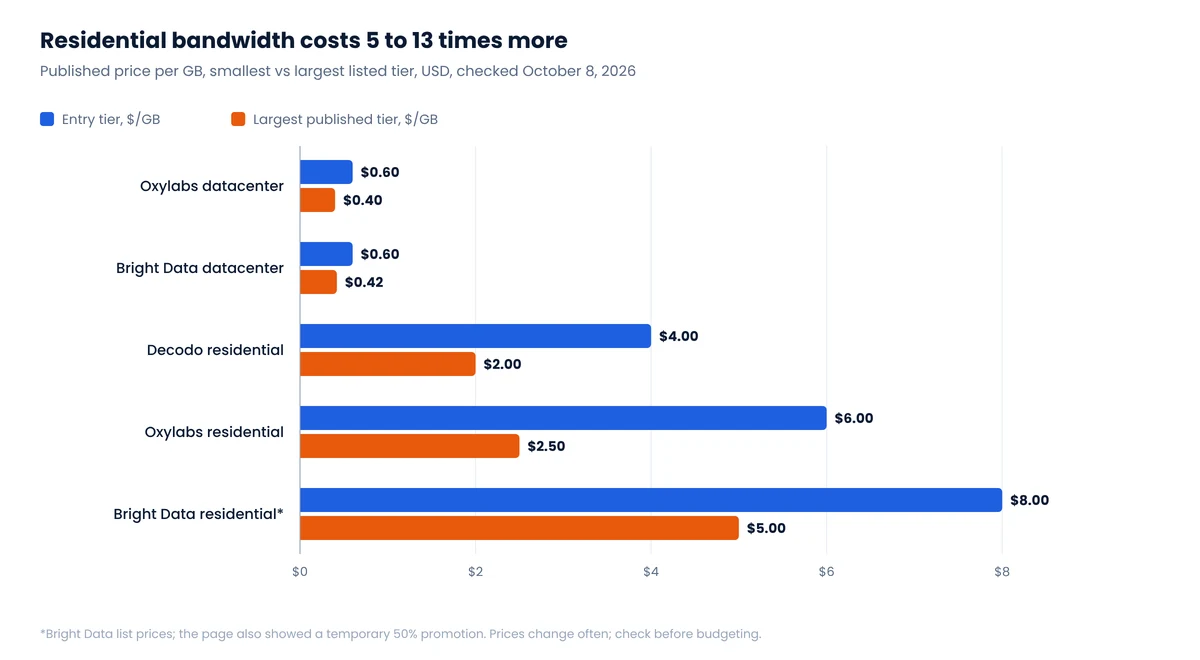
- Datacenter proxies cost about $0.40 to $0.60 per GB at major providers; residential costs $2 to $8 per GB. That’s a 5 to 13 times premium.
- Page weight drives the bill. One Amazon product page was about 2 MB of HTML in our check; a Target page about 0.3 MB.
- Compare proxy types on cost per valid record, not price per GB. A cheap proxy that gets blocked half the time is not cheap.
- Escalate one rung at a time, from no proxy to datacenter to ISP to residential, only when a measured block rate forces it.
- Ask how residential IPs are sourced. Google’s January 2026 takedown of the IPIDEA network showed what unconsented sourcing looks like.
The four proxy types in one table
| Type | Where the IP comes from | Usually billed | Speed | How anti-bot systems see it |
|---|---|---|---|---|
| Datacenter | Cloud and hosting providers | Per IP per month, or per GB | Fast, stable | Easy to classify as non-residential |
| ISP (static residential) | Datacenter-hosted IPs registered to consumer ISPs | Per IP | Fast, sticky | Looks residential, but a fixed IP builds history quickly |
| Rotating residential | Real household devices and connections | Per GB | Slower, variable | Hardest to separate from shoppers |
| Mobile | Carrier networks, many users per IP | Per GB or per port | Slowest | Blocking risks hitting real customers, so sites block cautiously |
Bright Data’s own explainer makes the key point about billing: datacenter plans are often sold per IP, residential per gigabyte. Comparing a monthly subscription price across types is meaningless until you convert both to the unit you actually consume.
What proxies cost in October 2026
| Provider and product | Entry price | Largest published tier |
|---|---|---|
| Oxylabs datacenter, per IP | $1.00 / IP | $0.60 / IP |
| Oxylabs datacenter, per GB | $0.60 / GB | $0.40 / GB |
| Bright Data datacenter, shared IPs | $1.40 / IP | $0.90 / IP |
| Bright Data datacenter, per GB | $0.60 / GB | $0.42 / GB |
| Decodo residential | $4.00 / GB | $2.00 / GB |
| Oxylabs residential | $6.00 / GB | $2.50 / GB |
| Bright Data residential (list) | $8.00 / GB | $5.00 / GB |
From Oxylabs, Bright Data and Decodo pricing pages, October 8, 2026. Bright Data’s residential page also displayed a temporary 50% promotion; we show list prices.1
Read the table as orders of magnitude, not quotes. The pattern is stable even as numbers move: residential bandwidth costs roughly 5 to 13 times more than datacenter bandwidth, and volume tiers halve the residential rate.
What one product page costs to fetch
Per-GB pricing makes page weight a budget line. We measured the server HTML of one product page at five US retailers:
| Retailer | HTML per page | GB per 1,000 pages | At $0.60/GB | At $4/GB | At $8/GB |
|---|---|---|---|---|---|
| Amazon | 1,988 KB | 1.90 | $1.14 | $7.58 | $15.17 |
| Best Buy | 1,332 KB | 1.27 | $0.76 | $5.08 | $10.16 |
| Walmart | 711 KB | 0.68 | $0.41 | $2.71 | $5.42 |
| Newegg | 450 KB | 0.43 | $0.26 | $1.72 | $3.43 |
| Target | 339 KB | 0.32 | $0.19 | $1.29 | $2.59 |
Uncompressed HTML of one product page per retailer, measured October 8, 2026. Compression makes transfers smaller; a headless browser loading images, scripts and fonts makes them several times larger.2
Two lessons. First, the rendering mode matters more than the proxy brand: fetching HTML with a plain HTTP client is far cheaper than driving a full browser through a per-GB proxy. Second, retailers that embed data in the initial HTML, like Walmart’s __NEXT_DATA__, let you skip the browser entirely; see Where e-commerce data actually lives. And some sources need almost no bandwidth at all: a Shopify store returns 250 products in a single /products.json response, as we show in our Shopify research.
Compare on cost per valid record
Price per GB ignores the number that matters: how many requests produce a usable, correct record.
Cost per 1,000 valid records
(proxy cost + compute + retries + engineering time) ÷ records that passed validation × 1,000
An illustration with made-up but realistic numbers: if datacenter IPs cost $1 per 1,000 pages but only 30% of pages pass validation on a tough target, you pay about $3.30 per 1,000 valid records plus the retries’ delay. If residential costs $5 per 1,000 pages and 95% pass, that’s about $5.30. Datacenter is still cheaper here, until block pages start leaking into your data or retries push the run past its deadline. On a friendlier target where datacenter IPs pass 90% of the time, residential is simply waste.
“Valid” has to mean more than HTTP 200. We use five checks, from transport to freshness, described with a diagram in the Walmart guide. Many “blocked” pages arrive as 200s.
Escalate one rung at a time
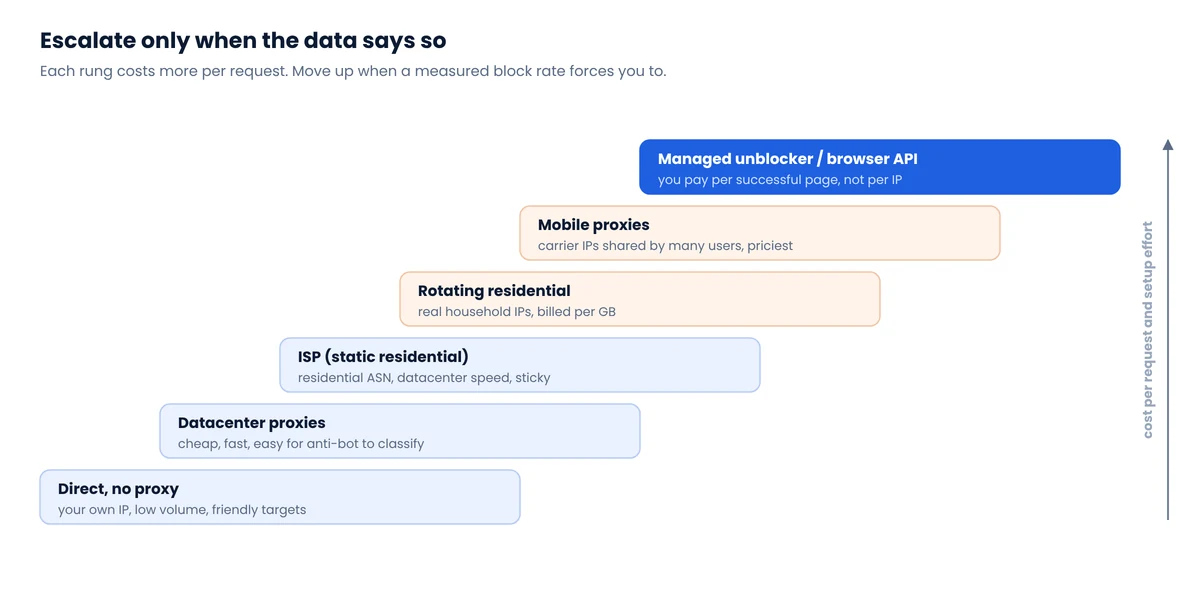
A practical test before committing budget:
- Pick 300 to 500 representative URLs for the target.
- Run them at your planned pace with no proxy (if volumes allow), then datacenter, then residential.
- For each run, record the five success layers, median latency and total bytes.
- Compute cost per 1,000 valid records and choose the cheapest type that meets your freshness deadline.
- Re-test quarterly. Targets change their defenses, and prices change too.
Before reaching for a more expensive rung, try the free fixes: slower pacing, fewer pages per item, consistent sessions and caching. They often move the block rate more than a new proxy type does. Our Amazon reality check covers those for the hardest target.
Where residential IPs come from, and why it matters
A residential proxy is someone’s home connection. Reputable providers say they recruit those devices with consent and pay or reward their owners. Not every network does. In January 2026 Google announced it had disrupted IPIDEA, which it described as one of the largest residential proxy networks. According to The Hacker News, IPIDEA’s SDKs were embedded in third-party apps, free VPNs and off-brand Android TV boxes, turning users’ devices into exit nodes; researchers counted about 5 million bots still connecting to its servers shortly after the takedown.
Buying cheap bandwidth from a network like that puts your traffic on hijacked devices and your company’s name next to it. Ask providers how IPs are sourced, whether owners opted in, and whether the provider complies with app-store and KYC rules. If the answers are vague, the low price is the warning.
FAQ
Are residential proxies necessary for e-commerce scraping?
Not always. Many stores, including most Shopify brands, work fine with datacenter IPs or no proxy at modest volumes. Heavily defended retailers often need residential IPs. Measure block rates on your targets before paying the premium.
How much do residential proxies cost?
In October 2026, published prices at major providers ranged from about $8 per GB at entry level down to about $2 to $2.50 per GB at the largest tiers. Datacenter bandwidth cost about $0.40 to $0.60 per GB.
What are ISP proxies?
IPs registered to consumer internet providers but hosted in datacenters. They combine a residential-looking address with datacenter speed and are usually sold per IP. Because the IP is static, it accumulates reputation quickly.
How do I calculate proxy cost per scraped page?
Multiply the bytes transferred per page by the price per GB, then divide total spend by the number of pages that passed validation. HTML-only fetching is far cheaper than loading full pages in a browser.
Notes
- Decodo’s largest tier is listed as an enterprise rate at 1 TB. Oxylabs’ largest residential tier applies from 1,000 GB. Prices exclude VAT and change frequently; check before budgeting. ↩
- KB here means the character length of the server HTML, before compression. Most servers compress HTML in transit, which typically cuts transferred bytes several-fold; full-browser rendering adds images, fonts and scripts on top. Treat the table as an order-of-magnitude guide. ↩
Rather not manage proxies at all?
With JsonEngine you pay for delivered, validated data, not for gigabytes. Infrastructure choices are ours to optimize.
