
Insights
Pagination Limits on Major Retailers and How to Work Around Them

Oct
A category page says “3,412 results.” You click “next” until it stops, and you have 1,000. Nothing is broken. Most store search engines simply refuse to page that deep. If your job is a complete catalog, pagination is the wrong tool on its own.
Key takeaways
- Result caps are normal. Elasticsearch, which powers many store searches, stops paging at 10,000 hits by default.
- Known caps range from 40 results (Walmart’s seller search API) to 25,000 products (Shopify’s public feed, which we measured).
- The fix is to split one big query into many small ones, each under the cap: price bands, brands, subcategories.
- Better still, skip search: category trees, sitemaps and feeds often list everything.
- Measure coverage in unique product IDs, never in pages. Cross-listing alone made 13% of Gap.com’s listings duplicates in our data.
Why retailers cap pagination
Deep pages are expensive. To show results 9,951 to 10,000, a search engine has to rank the first 10,000 and throw most of them away, on every request. So engines set a ceiling. Elasticsearch’s documentation says plainly that by default you cannot use from and size to page past 10,000 hits, a safeguard set by index.max_result_window. Many retailers set their own, lower limits on top, partly for performance and partly because almost no human goes past page five, while scrapers do.
The limits we know about
| Where | Limit | Source and type |
|---|---|---|
Shopify /products.json | 250 per page; HTTP 400 once page × limit exceeds 25,000 | Our measurement on 50 stores, Oct 2026 |
| Amazon search | Sometimes 7 or 20 pages (about 300 product URLs), often under “All Departments” | Scraping tool documentation (Web Scraper) |
| Walmart search | About 25 pages per query | Scraping vendor reports; Walmart’s robots.txt also disallows /search |
| eBay Browse API search | At most 10,000 items per result set | eBay developer documentation |
| Walmart Marketplace Item Search API | Up to 40 results per keyword or identifier search | Walmart developer documentation |
| Sites on Elasticsearch defaults | 10,000 hits via from/size | Elastic documentation |
Limits vary by query, category and over time. Treat third-party figures as observations, and test your own target before relying on any of them.
Note the mix of units: pages, items, results. A “25-page” cap might be 1,000 items at 40 per page or 600 at 24. Always convert to the number of distinct products you can actually reach.
Technique 1: slice the query until each slice fits
If one query can show at most N results, ask many queries that each have fewer than N. The union, deduplicated by product ID, covers far more of the catalog.
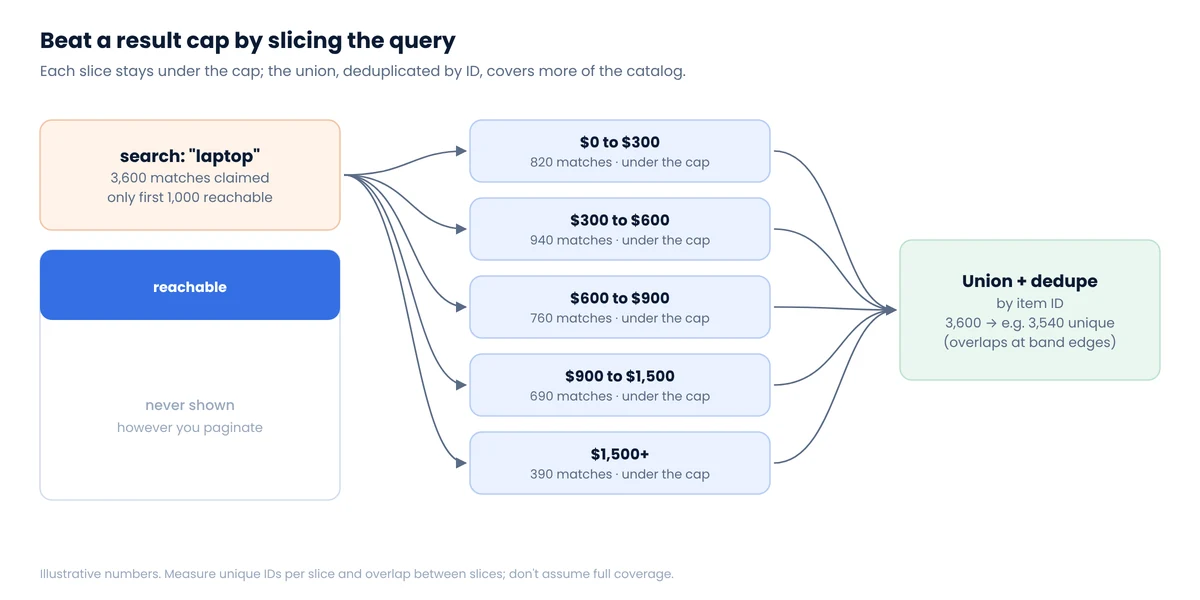
Good slicing dimensions are ones every product has exactly one value for: price, brand, subcategory, seller. Price is the most universal. Rather than guessing bands, split adaptively:
Python: adaptive price-band splittingdef bands(count, lo=0.0, hi=10_000.0, cap=1_000, min_width=0.01):
"""Yield (lo, hi) price ranges whose result count fits under the cap.
count(lo, hi) must return the site's reported number of results
for the same query restricted to that price range.
"""
n = count(lo, hi)
if n == 0:
return
if n <= cap or hi - lo <= min_width:
yield lo, hi, n # fits; or can't split further (many items at one price)
return
mid = round((lo + hi) / 2, 2)
yield from bands(count, lo, mid, cap, min_width)
yield from bands(count, mid, hi, cap, min_width)
# for lo, hi, n in bands(my_count_fn): crawl(query, lo, hi) # then dedupe by product id
Two edge cases matter. Products priced exactly on a boundary may appear in both neighbors (dedupe handles that) or in neither, if the site’s filter is exclusive on both ends (test with a known product). And a single price point can hold more items than the cap, such as hundreds of $19.99 phone cases; split those by brand or subcategory instead.
What about changing the sort order?
Fetching the first N results sorted by price ascending, then descending, then by newest, does reach some extra products. It does not guarantee anything: the sorts overlap heavily, and the middle of the list stays hidden. Use it as a supplement and measure what it adds in new IDs.
Technique 2: don’t use search at all
Search is the most protected and most capped part of most stores. Alternatives often list everything:
- Category trees. Leaf categories are small enough to stay under caps. Walk the tree, not the search box.
- Sitemaps. Many retailers publish product sitemaps listing every product URL. They’re built for crawlers and are usually the least controversial way to enumerate a catalog.
- Public feeds. Shopify stores expose
/products.json, which lists up to 25,000 products without any search; our Shopify research covers its quirks, including short pages that end naive loops early. - Collections or brand pages, each with its own cap.
Once you have a list of product IDs, you visit product pages directly, which is also the gentlest pattern for sites like Walmart.
Measure coverage in unique products
Counting pages or rows tells you nothing about completeness. Count unique product IDs, and check for overlap.
In our Gap.com catalog dataset, 346 products appeared in more than one category: a kids’ tee under both Boys and Girls, slippers under Shoes, Accessories and Pajamas. Without dedupe, every count and average would be inflated. Large catalogs are trees with shared branches; our IKEA USA collection spans 583 category paths for 8,855 products.
Three checks we run on every catalog crawl:
- Saturation. Plot unique IDs against requests made. When new slices stop adding IDs, you’re near the reachable total.
- Independent total. Compare with any count the site exposes elsewhere, such as Shopify’s
/meta.jsonor category headers, and explain the gap. - Known-item test. Pick 50 products found by browsing manually and confirm they’re in your data.
Complete catalogs are the foundation of assortment tracking: you can’t detect a delisted product you never saw.
FAQ
Why does a store say 3,000 results but only show 1,000?
Its search engine caps how deep you can page, for performance and to deter scraping. The total is real; the deep pages are simply not served.
How do I scrape all products in a category?
Split the category into slices that each fit under the cap, using subcategories, brands or price bands, then merge and deduplicate by product ID. Product sitemaps and public feeds are often an easier route.
What is the Shopify products.json limit?
250 products per page and a ceiling of 25,000 products through page-based paging. Beyond that the endpoint returns HTTP 400 with “Page * Limit exceeds the 25000 limit.”
Does sorting results differently get around the cap?
Partly. Different sort orders surface some extra products, but they overlap heavily and leave the middle of the list unreachable. Use slicing as the main method.
Need a complete catalog, not the first 1,000?
Our catalog datasets come with coverage checks: unique IDs, dedupe and a comparison against independent totals where the store provides one.
