
Insights
How to Scrape Walmart Prices Without Getting Blocked
Oct
Walmart’s US e-commerce sales reached $79.3 billion in fiscal 2025 (the year to January 2025), according to its annual report, which makes its prices a reference point for much of US retail. Getting them is two problems: not getting blocked, and not getting the wrong price without noticing. Most guides only cover the first.
Key takeaways
- Walmart.com is a Next.js app. On the product page we checked, 523 KB of the 711 KB server HTML was the
__NEXT_DATA__payload, and that is where the price lives. - There was no schema.org
Productin the page’s JSON-LD, only aWebPageblock. Don’t rely on structured data here. - Without asking, Walmart assigned our visitor store 3081 and ZIP 95829 in California. Your scraper gets a store too, and its price may not be the one you meant to track.
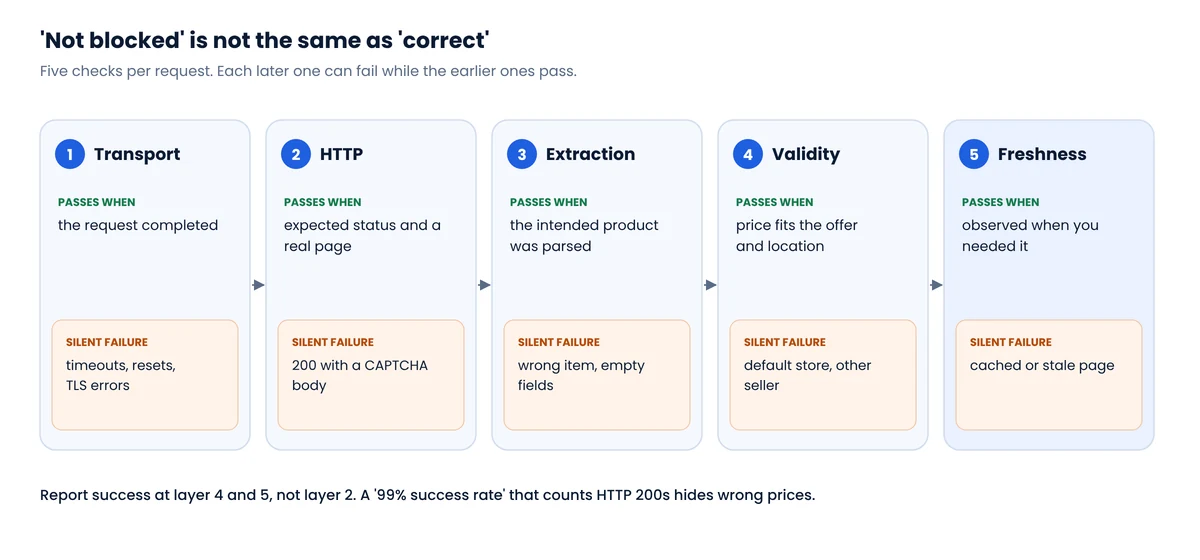
- Blocks are often silent: HTTP 200 with a “Robot or human?” page. Classify responses before parsing.
- The best way to avoid blocks is to need fewer requests: product pages from a known item list, not deep search pagination.
How a Walmart product page is built
We loaded a Walmart product page on October 8, 2026 and inspected the HTML the server returns, before any JavaScript runs. The structure was typical of a Next.js Pages Router site: a large JSON document in a <script id="__NEXT_DATA__"> tag that the browser uses to hydrate the page.
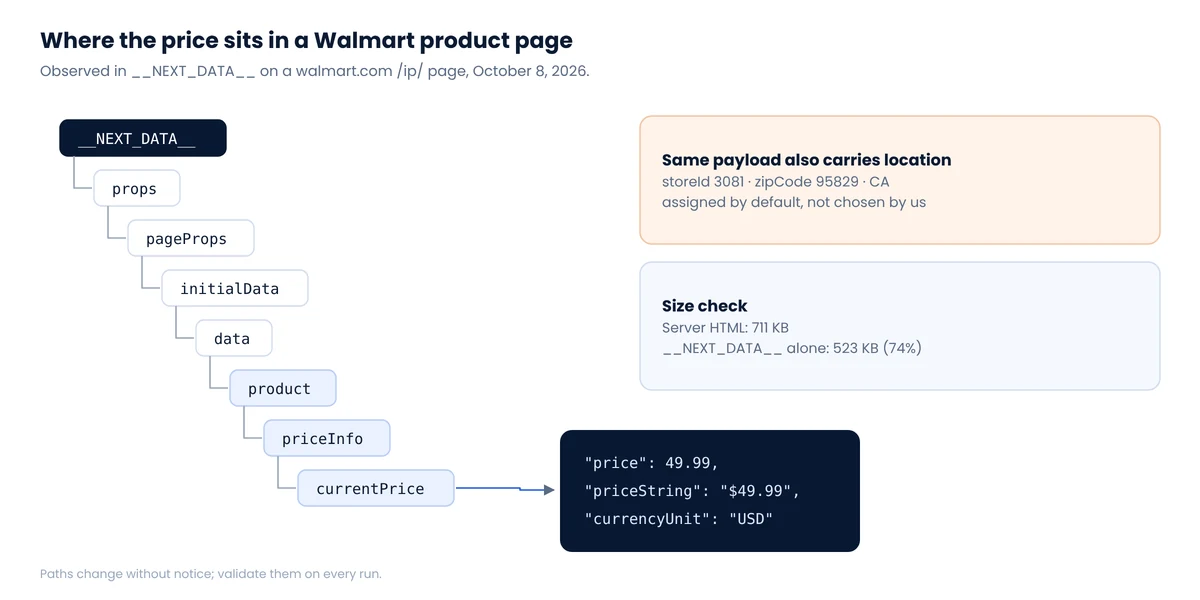
Two practical consequences. First, you do not need a headless browser to read the price: the data is in the initial HTML, so a plain HTTP request and a JSON parser are enough, and far cheaper. Second, each page is heavy. At residential proxy rates, 700 KB per product adds up quickly, which is one reason to keep the number of pages per run low. We compare page weights across retailers in Where e-commerce data actually lives.
Extracting the price from __NEXT_DATA__
The parsing itself is short. The part that matters is refusing to return a price when anything about the page is off.
Python: parse a Walmart product page you already fetchedimport json, re
from bs4 import BeautifulSoup
def parse_walmart(html: str, expected_item_id: str) -> dict:
soup = BeautifulSoup(html, "html.parser")
title = soup.title.string if soup.title else ""
if "Robot or human" in title:
return {"status": "blocked"}
tag = soup.find("script", id="__NEXT_DATA__")
if tag is None:
return {"status": "no_next_data"} # block page or new layout
data = json.loads(tag.string)
product = (data.get("props", {}).get("pageProps", {})
.get("initialData", {}).get("data", {}).get("product"))
if not product:
return {"status": "no_product"}
price = (product.get("priceInfo") or {}).get("currentPrice") or {}
store = re.search(r'"storeId":"?(\d+)', tag.string)
zipc = re.search(r'"(?:zipCode|postalCode)":"(\d{5})"', tag.string)
row = {
"status": "ok",
"item_id": expected_item_id,
"name": product.get("name"),
"price": price.get("price"),
"currency": price.get("currencyUnit"),
"price_text": price.get("priceString"),
"store_id": store.group(1) if store else None,
"zip": zipc.group(1) if zipc else None,
}
if expected_item_id not in html:
row["status"] = "wrong_item"
elif row["price"] is None or row["currency"] != "USD":
row["status"] = "no_price"
return row
Treat the path as a snapshot, not a contract. Walmart can rename keys at any deploy. Check your extraction rate after every run, and when no_product spikes without blocks, open a page and look for the new path before touching anything else.
The price you get depends on a store you didn’t choose
When we opened walmart.com from a browser in Europe, the site set a cookie with assortmentStoreId=3081, and the page payload carried storeId 3081, zipCode 95829 and state CA. That is a Sacramento-area store we never selected. A scraper running from a datacenter in Virginia will be assigned something else.
This matters because Walmart’s assortment, availability and some prices vary by store. Two runs from different proxy locations can produce a “price change” that is really a store change. The fix is procedural:
- Choose the store or ZIP your analysis should represent, and set it the way a shopper would.
- Store
store_idandzipwith every price, as in the parser above. - Reject observations whose store differs from the one you configured.
We see the same pattern at Target, Amazon and many grocers. The full story, with what three retailers assumed about our test visitor, is in Zip-code pricing: why your scraped prices are wrong.
Why Walmart blocks scrapers, and what a block looks like
Retail is a heavily targeted sector. According to Thales/Imperva, bad bots made up 33% of traffic to retail websites in 2024. Public write-ups from scraping vendors describe Walmart running more than one layer of protection, including HUMAN Security’s (formerly PerimeterX) “Press & Hold” challenge. Whatever the exact stack on a given day, the important detail for data quality is how a block looks:
| What you receive | What it usually means | Store it? |
|---|---|---|
| HTTP 200, page title “Robot or human?” | Challenge page served instead of the product | No, log as blocked |
Redirect to a /blocked URL | Request rejected | No |
HTTP 200, no __NEXT_DATA__ tag | Challenge, error template or new layout | No, investigate |
| HTTP 429 or 5xx | Rate limiting or server trouble | No, back off |
| Valid page, different store ID than configured | Session lost its location | No, re-establish location |
| Valid page, item ID not in the HTML | Redirected to another product | No |
Notice that four of the six arrive as HTTP 200. A monitoring dashboard that counts status codes will report near-perfect success while the price table fills with gaps and wrong stores.
Reducing blocks by asking for less
“Without getting blocked” is the wrong goal. The right goal is the smallest number of requests that answers your question, made at a pace that doesn’t stand out. In practice:
- Work from an item list, not search. Walmart’s robots.txt disallows
/search, and search pagination is reported to stop at 25 pages anyway. Build your list of item IDs once from category pages or a sitemap, then visit product pages directly. Our pagination guide covers how to build that list completely. - One page per item per cycle. The product page already contains price, availability and seller. Skip review and Q&A pages unless you need them.
- Spread the run. Ten thousand items a day is about seven a minute. There is rarely a reason to fetch them in a ten-minute burst.
- Keep sessions consistent. A session that holds its cookies and location looks more like a shopper than a stream of fresh, location-less requests, and it keeps your store ID stable.
- Back off on signals. Pause a worker on 429s and challenge pages instead of retrying immediately from another IP.
- Escalate infrastructure only on evidence. If the measured block rate stays high after the steps above, then consider a different proxy type. Our proxy comparison shows what that costs per gigabyte.
A useful sanity check
Pick 20 items and check them by hand in a browser set to the same store, once a week. If your scraped price disagrees on more than one or two, you have a context problem, not a blocking problem.
Is there an official Walmart API instead?
Not for general competitor monitoring. Walmart’s developer platform is built for marketplace sellers: the Item Search endpoint supports keyword, UPC, GTIN and similar lookups but returns up to 40 results per query and is meant for listing your own items. It is handy for resolving a UPC to a Walmart item; it won’t replace shelf-price collection. We compare the main retail APIs in Web scraping vs official APIs.
FAQ
Where is the price in a Walmart page’s HTML?
In the __NEXT_DATA__ JSON script. On the page we checked in October 2026 it was at props.pageProps.initialData.data.product.priceInfo.currentPrice.price, with priceString and currencyUnit next to it. The path can change, so validate it on every run.
Do I need a headless browser to scrape Walmart?
Usually not for prices, because the data is in the initial HTML. A headless browser costs more per page and is only worth it if you need content rendered after page load.
Why do my Walmart prices differ from what I see in my browser?
Most often because your scraper and your browser are assigned different stores. Walmart sets a store ID and ZIP for every visitor; record it with each price and keep it fixed.
Why does Walmart return a “Robot or human?” page?
The request was classified as automated. Slow down, keep sessions consistent, avoid search pagination, and treat the page as a failure rather than data.
Need store-accurate Walmart prices?
Walmart is in our later wave of supported sites because we only add stores where we can guarantee the store context. If Walmart is on your list, tell us which stores and categories matter.
