
Insights
JSON-LD, NEXT_DATA and PRELOADED_STATE: Where E-commerce Data Actually Lives
Oct
Modern store pages ship their data twice: once as HTML for the shopper, and once as JSON for the JavaScript that runs the page. The JSON is usually richer, cleaner and more stable than the markup. Finding it is the single biggest shortcut in e-commerce scraping, as long as you know which of the several JSON blobs to trust.
Key takeaways
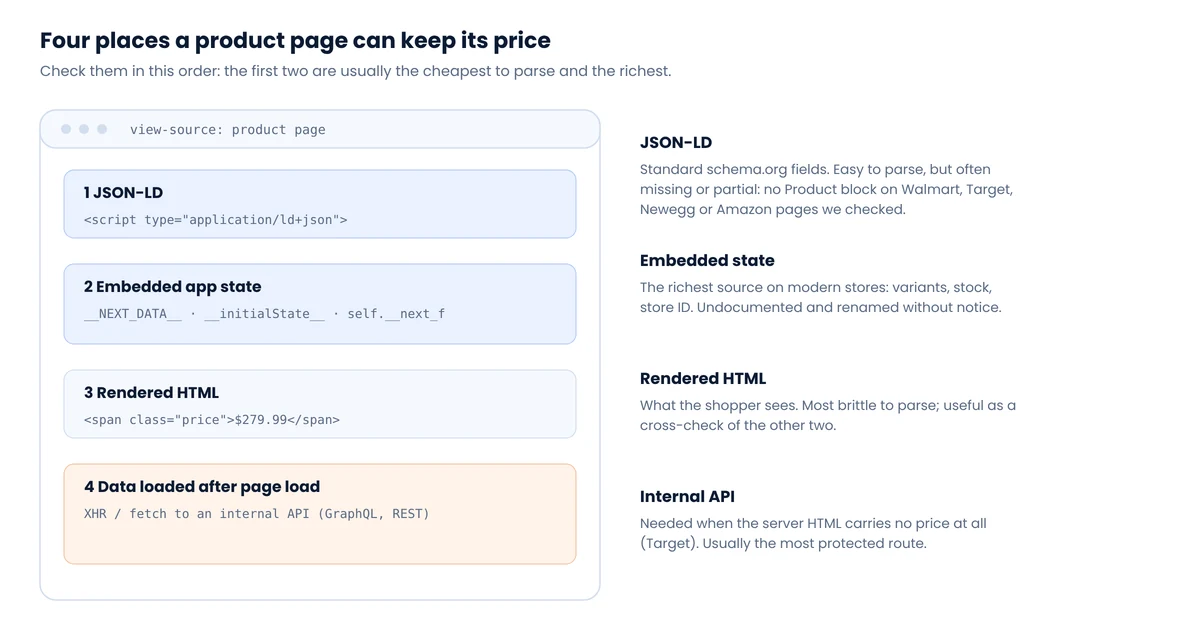
- Look in four places, in order: JSON-LD, embedded app state, rendered HTML, and APIs called after load.
- JSON-LD is easiest to parse but often absent: of five big US retailers we checked, only Best Buy had a schema.org
Productwith a price. __NEXT_DATA__exists only on Next.js “Pages Router” sites. App Router sites stream data throughself.__next_f.push()instead.__PRELOADED_STATE__is a naming convention from Redux docs, not a standard. Each site’s state has its own shape.- Pages carry many prices. On Best Buy, the first
regularPricein the source belonged to a mouse in a recommendations widget, not the laptop on the page.
What we found on five big US retailers
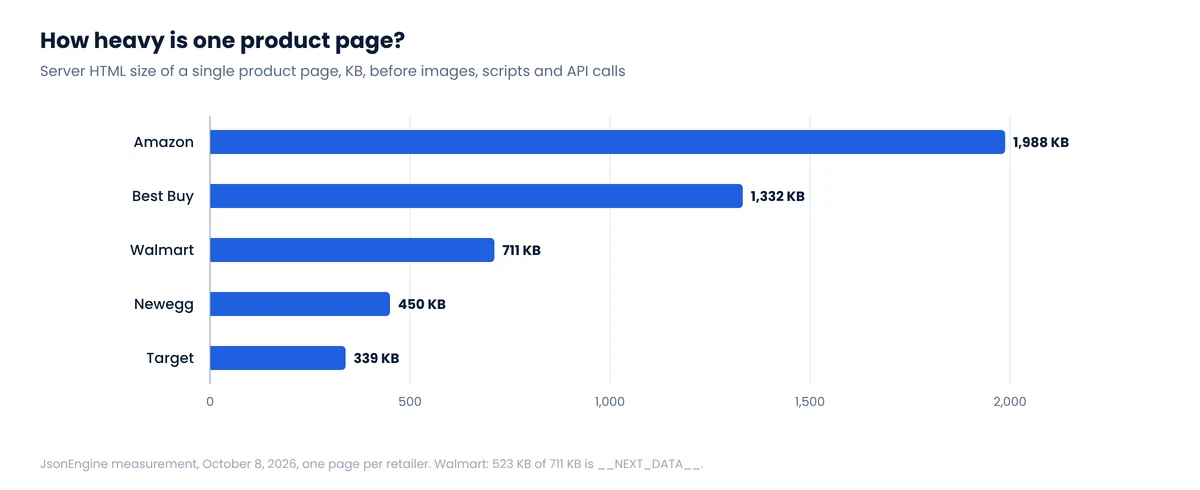
On October 8, 2026 we fetched one product page from each of five large US retailers in a regular browser session and inspected the server HTML, before any client-side JavaScript ran.
| Retailer | JSON-LD on the product page | Embedded state | Price in server HTML? |
|---|---|---|---|
| Walmart | WebPage only, no Product | __NEXT_DATA__, 523 KB | Yes, inside __NEXT_DATA__ |
| Target | None | __NEXT_DATA__ (156 KB) + __TGT_DATA__ | No. Loaded later from an API |
| Best Buy | Product with price, BreadcrumbList, ItemList | App Router flight data (self.__next_f) | Yes, in both |
| Amazon | None | Inline JavaScript for variations | Yes, in the HTML price block |
| Newegg | Breadcrumbs, images, FAQ, item lists; no Product | window.__initialState__ | Yes, in state and HTML |
One product page per retailer, viewed without login. Structures change; treat this as a snapshot.
Three different conclusions fall out of five sites. Structured data is not something you can count on at the biggest stores. Next.js is common, but in two different flavors. And at least one major retailer, Target, doesn’t put the price in the initial page at all.
1. JSON-LD: the standard, when it exists
JSON-LD is structured data in a <script type="application/ld+json"> tag, using schema.org vocabulary. Retailers add it for search engines; Google’s Product structured data guide lists price, availability, ratings and shipping among the supported properties. When it’s present it’s the cleanest source on the page: documented field names, typed values, one object per product.
import json
from bs4 import BeautifulSoup

def jsonld_products(html: str) -> list[dict]:
    soup = BeautifulSoup(html, "html.parser")
    found = []
    for tag in soup.find_all("script", type="application/ld+json"):
        try:
            data = json.loads(tag.string or "")
        except json.JSONDecodeError:
            continue                          # broken JSON-LD is common
        items = data if isinstance(data, list) else data.get("@graph", [data])
        for item in items:
            types = item.get("@type")
            types = types if isinstance(types, list) else [types]
            if "Product" in types or "ProductGroup" in types:
                found.append(item)
    return found
Price semantics: which price is it?
A JSON-LD offers block can hold more than one price. Google’s merchant listing documentation distinguishes the active selling price from a strikethrough (previous) price and from member-only prices. A parser that grabs the first price it sees can record a crossed-out price as current, or a loyalty price as the public one. Read the price specification type, not just the number, and keep each type in its own column.
Also watch for AggregateOffer with lowPrice and highPrice: that’s a range across variants or sellers, not a price.
2. __NEXT_DATA__: Next.js Pages Router
Sites built on Next.js with the older Pages Router serialize each page’s data into a single JSON script: <script id="__NEXT_DATA__" type="application/json">. The browser uses it to hydrate React; you can use it to skip HTML parsing entirely.
These payloads get big. Next.js itself warns when page data exceeds 128 kB, according to its large-page-data notice. That’s a performance warning, not a limit: the Walmart page we checked carried 523 KB. Big payloads are good news for completeness and bad news for bandwidth, which matters once you pay per gigabyte; see our proxy cost comparison.
Python: read __NEXT_DATA__ and find a key anywhere in itimport json
from bs4 import BeautifulSoup
def next_data(html: str) -> dict | None:
tag = BeautifulSoup(html, "html.parser").find("script", id="__NEXT_DATA__")
return json.loads(tag.string) if tag else None
def find_paths(obj, key, path=""):
"""Yield every JSON path that ends in `key`. Use it to explore."""
if isinstance(obj, dict):
for k, v in obj.items():
p = f"{path}.{k}" if path else k
if k == key:
yield p, v
yield from find_paths(v, key, p)
elif isinstance(obj, list):
for i, v in enumerate(obj):
yield from find_paths(v, key, f"{path}[{i}]")
# for p, v in find_paths(next_data(html), "currentPrice"): print(p, v)
Exploration with a helper like find_paths is how you discover that Walmart’s price sits at props.pageProps.initialData.data.product.priceInfo.currentPrice, as we show in the Walmart guide. Once you know the path, hard-code it and alert when it disappears.
No __NEXT_DATA__? It may be the App Router
Next.js’s newer App Router uses React Server Components and doesn’t emit __NEXT_DATA__. Instead the page contains many small scripts calling self.__next_f.push([...]), which together carry a serialized component tree in React’s own wire format. Best Buy’s product page worked this way in our check. The data is there, including the price, but it’s not one JSON document: values are split across chunks and reference each other.
For quick extraction, people search the concatenated chunk strings for a known key. That works, but it’s exactly where the most common mistake happens.
The first price on the page is often someone else’s
On the Best Buy laptop page we checked, the first "regularPrice" in the source was 79.99. It belonged to an Apple Magic Mouse in a recommendations block. The laptop’s own customerPrice was 1099, matching the JSON-LD. Always anchor extraction to the product’s ID or SKU, never to the first match of a key name.
For anything beyond spot checks, use a parser built for the format (the open-source njsparser Python package is one) and select objects by product identifier.
3. __PRELOADED_STATE__ and other window globals
The name __PRELOADED_STATE__ comes from Redux’s server rendering guide, which shows the server writing the store’s initial state into window.__PRELOADED_STATE__ and escaping < as < to prevent script injection. Many sites followed the pattern under their own names: __INITIAL_STATE__, __APOLLO_STATE__ for Apollo GraphQL caches, __NUXT__ or __NUXT_DATA__ for Nuxt, Newegg's window.__initialState__, Target's __TGT_DATA__.
There is no shared schema. Newegg's state carried "FinalPrice":279.99 for the processor we checked; Target's held location variables and no price. Some are plain object literals, others are JSON strings wrapped in JSON.parse("...") with escaped quotes. A generic extractor handles the common case and leaves the rest to per-site code:
import json, re

STATE = re.compile(r"window\.(__[A-Za-z0-9_]+__)\s*=\s*")

def window_states(html: str) -> dict:
    out, dec = {}, json.JSONDecoder()
    for m in STATE.finditer(html):
        start = m.end()
        if html[start] not in "{[":
            continue                          # JSON.parse("..."), function, etc.
        try:
            obj, _ = dec.raw_decode(html, start)   # stops at the end of the object
            out[m.group(1)] = obj
        except json.JSONDecodeError:
            pass                              # JS literal, not strict JSON
    return out
raw_decode parses one JSON value starting at a position and ignores what follows, so you don't need to find the closing brace yourself. It fails on JavaScript-only syntax such as unquoted keys or undefined; for those, a small JavaScript runtime or a per-site regex is the pragmatic fix.
4. When the price isn't in the page at all
Target's server HTML for the product we checked contained no dollar amounts at all. The price arrives afterwards from an internal API keyed by the item and the store. Open the browser's developer tools, filter the Network tab by "Fetch/XHR," reload, and search responses for the price you see on screen.
Internal APIs return compact, well-structured JSON, which makes them tempting. They are also undocumented, often require tokens or visitor IDs issued by the page, and tend to be the most closely watched endpoints on a site. Use them when the page gives you no alternative, keep volumes low, and expect them to change.
A working order of operations
- View source (not the inspector) and search for the price you see on screen.
- If it's in JSON-LD with a clear price type, start there.
- Otherwise look for
__NEXT_DATA__,self.__next_forwindow.__…__state, and find the product object by its ID. - Fall back to rendered HTML selectors only for fields that exist nowhere else.
- Where two sources exist, extract both and alert when they disagree. Disagreement is your earliest warning that a layout changed or a promotion started.
- Record the store or location you found in the same payload. As we show in Zip-code pricing, embedded state often reveals a location you never set.
For Shopify stores there's often an even shorter path: a public catalog feed, covered in Scraping Shopify via /products.json.
FAQ
What is __NEXT_DATA__?
A JSON script that Next.js Pages Router sites embed in every server-rendered page. It contains the props used to render the page, which on stores usually includes product, price and availability data.
Why can't I find __NEXT_DATA__ on a Next.js site?
The site probably uses the App Router, which streams React Server Component data through self.__next_f.push() calls instead of one JSON document.
Is JSON-LD price data reliable?
It's reliable when present and correctly typed, but many large retailers don't publish a Product block, and offers can mix current, strikethrough and member prices. Check the price type and cross-check against the visible page.
What is __PRELOADED_STATE__?
A convention from the Redux documentation for passing a server-generated store state to the browser. Sites use it and similar names, but each has its own structure; there's no standard product schema.
Do I need a headless browser to read embedded JSON?
No. Embedded JSON is in the server HTML, so a plain HTTP request is enough. You need a browser only when data is loaded after the page renders and you can't call that source directly.
Rather skip the reverse engineering?
We maintain extractors for the stores we support and monitor them for structure changes, so a renamed key becomes our alert, not your data gap.
