
Insights
Scraping Shopify Stores via the /products.json Endpoint
Oct
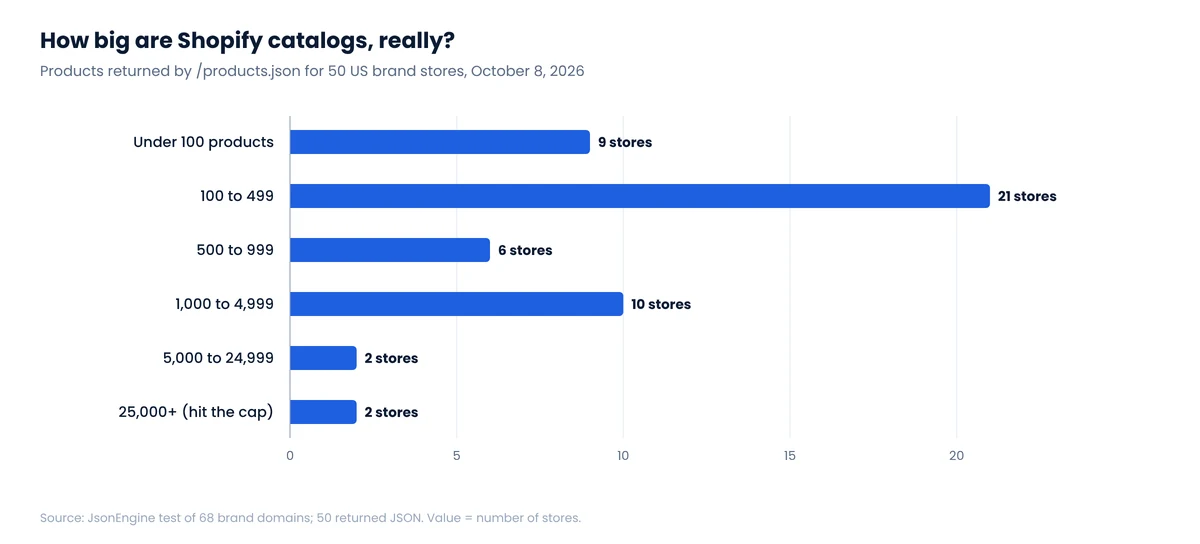
Shopify merchants processed $378.4 billion in gross merchandise volume in 2025, and a large share of US direct-to-consumer brands sell through it. Most of those stores answer a simple request, /products.json, with their full public catalog in JSON. Tutorials explain the endpoint in two paragraphs. We wanted numbers, so we tested it on 68 brand domains.
What we found
- 50 of 68 brand domains returned a usable catalog from
/products.json. The rest blocked us, returned 404 or didn’t answer a cross-origin request. - No store ever returned more than 250 products per page, even when we asked for 500.
- There is a hard ceiling: when page × limit passes 25,000, Shopify answers HTTP 400 with
"Page * Limit exceeds the 25000 limit."Two stores hit it. - 4 of 50 stores returned pages shorter than 250 before the end of the catalog. A loop that stops at the first short page would have lost up to 93% of one store’s products.
- Prices come in the shop’s base currency (we saw USD, CAD, GBP and EUR), not the currency or market a shopper in another country would see.
What /products.json is, and what it isn’t
Shopify stores expose several ways to read product data. They are easy to confuse because they return similar JSON, and advice written about one is often applied to another.
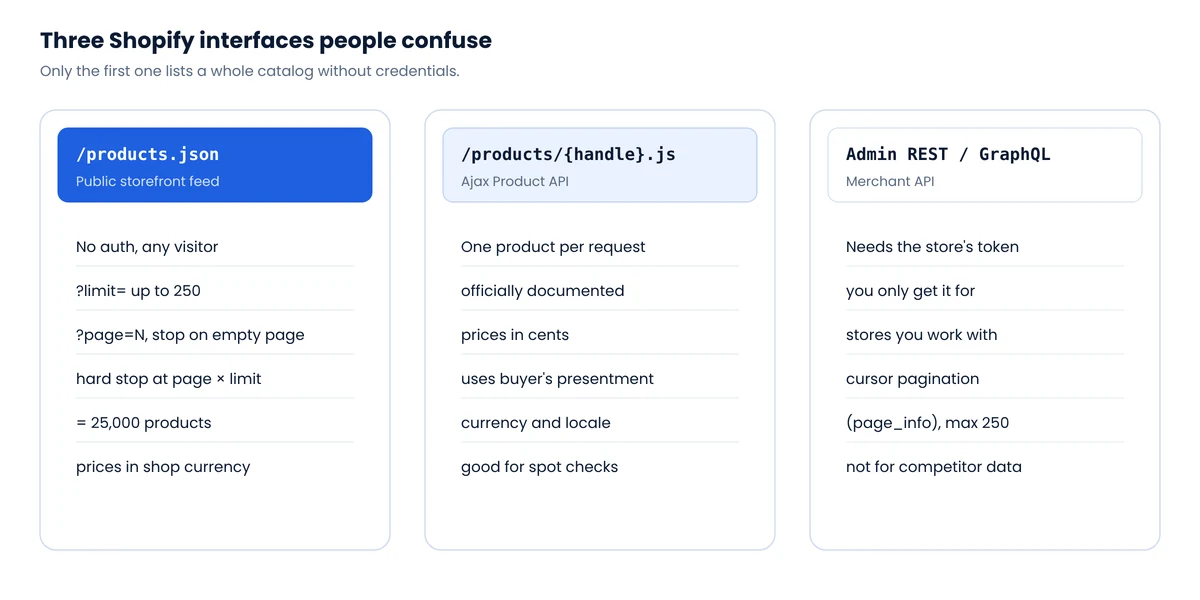
/products.jsonis the public storefront feed. No credentials, paginated with?limit=and?page=. It is not formally documented as an API, which is why its limits are folklore. That’s what we measured./products/{handle}.jsis the Ajax Product API, documented by Shopify. One product per request, prices in cents, and monetary values in the buyer’s presentment currency.- The Admin API needs the merchant’s access token. Its pagination docs describe cursor-based
page_infopaging with a 250-item maximum. That is a different interface; don’t expectpage_infoon the public feed.
Fields you get
Each product carries id, title, handle, body_html, vendor, product_type, tags, created_at, published_at, updated_at, options, images and variants. Each variant carries id, sku, price, compare_at_price, available, option1 to option3, grams and timestamps.
Equally important is what’s missing: no inventory quantity (only an available true/false), no currency field, no reviews, no barcode/GTIN, and nothing about prices for other markets or B2B catalogs.
Our test: 68 brand stores, one afternoon
Method
On October 8, 2026 we requested /products.json?limit=250&page=N from 68 well-known US-facing brand domains we believed to run on Shopify, from a desktop browser in Europe. For each store that answered, we paged until an empty page or an error, waited 250 ms between pages, recorded page sizes and unique product IDs, compared the total with the store’s /meta.json product count, and repeated page 1 with limit=500. One pass per store, no retries. We did not verify the platform of the 18 domains that didn’t answer, so don’t read the failure share as a Shopify-wide rate. The raw results are available as a CSV.
The 25,000-product ceiling
Kith and Fashion Nova returned full pages of 250 all the way to page 100. Page 101 returned HTTP 400 with the body {"errors":"Page * Limit exceeds the 25000 limit."}. Both stores’ /meta.json reported 25001 published products, which looks like a capped counter rather than a real total. In other words, for the largest Shopify stores the public feed cannot tell you how many products exist, let alone list them all.
Products came back newest first: on Kith, page 1 started with items created the previous day. So the 25,000 you can reach are the most recent ones, and older catalog depth is what you lose.
Short pages that aren’t the end
Most tutorials say “stop when a page returns fewer items than the limit.” On 46 of the 50 stores that works. On four it doesn’t:
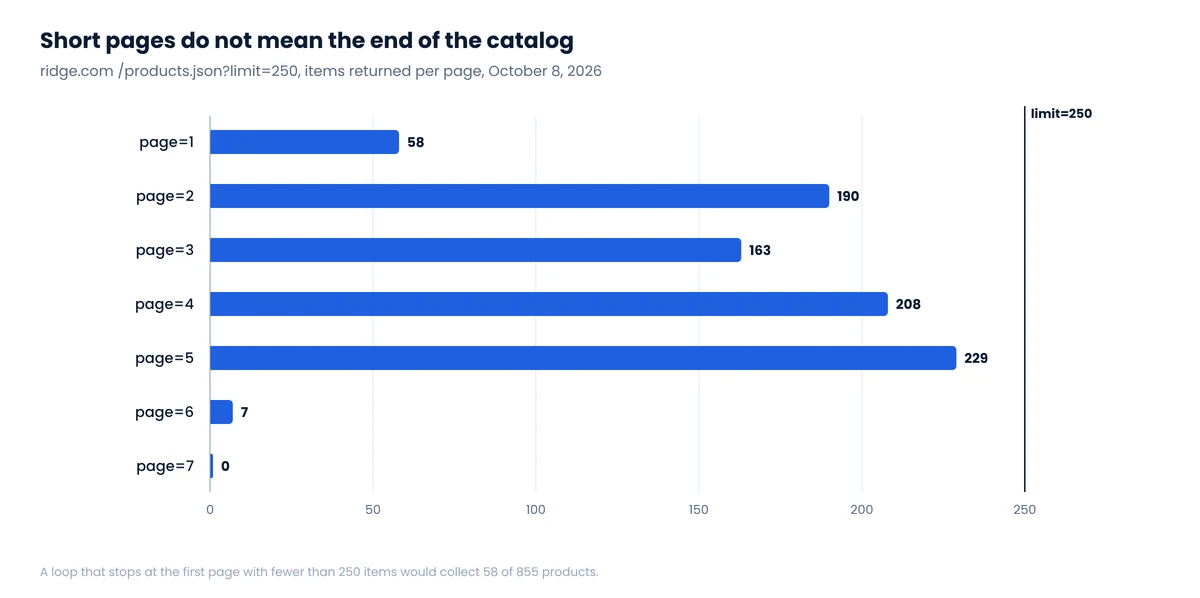
| Store | Items per page (limit=250) | Real total | Lost by “stop on short page” |
|---|---|---|---|
| ridge.com | 58, 190, 163, 208, 229, 7, 0 | 855 | 797 (93%) |
| drsquatch.com | 221, 213, 62, 0 | 496 | 275 (55%) |
| mejuri.com | 250, 248, 206, 0 | 704 | 206 (29%) |
| rains.com | 230, 78, 0 | 308 | 78 (25%) |
Our best guess is that these stores filter some products out of each page after pagination is applied, for example items hidden from the online store channel, so a page of 250 slots arrives partly empty.1 Whatever the cause, the fix is simple: stop on an empty page, never on a short one.
Totals you can check against
Every store that answered also served /meta.json with a published_products_count. For 41 of the 48 stores below the cap our count matched exactly, six were within three products, and one differed by 23. That makes meta.json a cheap completeness check after each run, as long as the store is under the cap.
A collector that handles all of this
The script below pages correctly, respects rate limits, detects the 25,000 cap and checks completeness. It uses only requests.
import csv, time, requests

S = requests.Session()
S.headers["User-Agent"] = "Mozilla/5.0 (compatible; catalog-check/1.0; +https://example.com/bot)"

def get(url, tries=4):
    for i in range(tries):
        r = S.get(url, timeout=30)
        if r.status_code == 429:                 # rate limited: wait and retry
            time.sleep(int(r.headers.get("Retry-After", 5 * (i + 1))))
            continue
        return r
    r.raise_for_status()

def collect(domain, delay=1.0):
    base = f"https://{domain}"
    meta = get(f"{base}/meta.json").json()
    products, page = {}, 0
    capped = False
    while True:
        page += 1
        r = get(f"{base}/products.json?limit=250&page={page}")
        if r.status_code == 400 and "25000" in r.text:
            capped = True                         # page * limit > 25,000
            break
        r.raise_for_status()
        batch = r.json()["products"]
        if not batch:                             # stop on EMPTY, not short
            break
        for p in batch:
            products[p["id"]] = p                 # dedupe by product id
        time.sleep(delay)
    expected = meta.get("published_products_count")
    print(f"{domain}: {len(products)} products, meta says {expected}, "
          f"currency {meta.get('currency')}, capped={capped}")
    return meta, list(products.values())

def to_rows(domain, meta, products):
    for p in products:
        for v in p["variants"]:
            yield {
                "domain": domain, "currency": meta.get("currency"),
                "product_id": p["id"], "handle": p["handle"], "title": p["title"],
                "vendor": p["vendor"], "product_type": p["product_type"],
                "variant_id": v["id"], "sku": v.get("sku"), "variant": v["title"],
                "price": v["price"], "compare_at_price": v.get("compare_at_price"),
                "available": v.get("available"), "updated_at": v.get("updated_at"),
            }

if __name__ == "__main__":
    domain = "www.allbirds.com"
    meta, products = collect(domain)
    rows = list(to_rows(domain, meta, products))
    with open("catalog.csv", "w", newline="") as f:
        w = csv.DictWriter(f, fieldnames=rows[0].keys())
        w.writeheader(); w.writerows(rows)
A one-second delay is deliberately conservative. Most catalogs in our sample need one to four requests, so politeness costs you seconds, not hours.
Getting past the 25,000 cap
For the handful of stores above the ceiling, the cap applies per listing, not per store. Two routes help:
- Per collection.
/collections.jsonlists collections (also 250 per page), and/collections/{handle}/products.jsonpages through each one under its own 25,000 limit. Merge and deduplicate on product ID. Note that/collections/all/products.jsonis capped at the same page 100 as the main feed; we checked. - Per product. Product sitemaps list every product URL. You can enumerate handles from them and fetch
/products/{handle}.jsfor each. It’s one request per product, so use it to fill gaps, not as the main route.
Measure what each route adds in unique IDs rather than assuming it is complete. The same idea applies to every retailer with a result cap, as we explain in Pagination limits on major retailers.
Prices: base currency vs what a shopper sees
All 50 stores returned prices in their shop currency: 47 in USD, and one each in CAD, GBP and EUR. None adjusted to our European location. That is correct behavior for a base-price feed, and it is a trap if you compare stores across countries.
Shopify’s own Markets documentation warns developers not to compute an international market’s price from base variant prices and to request each market’s prices from Shopify instead, because markets can have their own price lists, rounding and currency. The Ajax .js endpoint returns presentment-currency prices and supports locale-prefixed URLs, which makes it the better tool for checking what a shopper in a given market pays. We dig into price context in Zip-code pricing: why your scraped prices are wrong.
Two more price details trip people up:
priceis a string like"25.00"in the JSON feed but an integer in cents (2500) in the Ajax API. Normalize before comparing.compare_at_priceusage varies enormously. In our sample, the share of variants with a compare-at price ranged from 0% to 98% depending on the store. Some brands use it for real markdowns, others as a permanent “was” price. Treat it as a store-specific signal, not a universal discount flag.
What /products.json won’t give you
- Stock levels. Only an
availableboolean per variant. For stock movement over time, track availability changes between runs, which is what our assortment and stock tracking does. - Identifiers for matching. SKUs are merchant-specific and barcodes aren’t in the feed. Cross-store matching needs more work; see How to match products across stores.
- Every store. Some brands block the endpoint (Gymshark returned 403), run a headless storefront on another domain, or sit behind a bot challenge. For those, product pages and their embedded data are the fallback, covered in Where e-commerce data actually lives.
Is it OK to use /products.json?
The endpoint is served to any visitor without a login, and the Shopify robots.txt files we looked at do not disallow it. That puts it on the low-risk end of public data collection, and it is also the lightest possible load on the store: one request instead of 250 page views. Still, keep requests slow, don’t republish product descriptions or photos, and stop if a store asks you to. Our legal overview explains the wider picture.
FAQ
How many products can /products.json return?
Up to 250 per page. In our October 2026 test, asking for limit=500 still returned 250. The total reachable through page-based paging is capped at 25,000 products: beyond page × limit = 25,000 the endpoint returns HTTP 400.
Does every Shopify store have /products.json?
Most do, but not all respond. In our test 50 of 68 brand domains returned a catalog; others returned 403 or 404, or ran headless storefronts on other domains.
When should my scraper stop paginating?
When a page returns zero products, or on an HTTP 400 at the 25,000 cap. Do not stop on a page with fewer than 250 items: four of the 50 stores we tested returned short pages mid-catalog.
Does /products.json use page_info cursors?
No. Cursor-based page_info pagination belongs to the authenticated Admin API. The public storefront feed uses ?page=N.
Are /products.json prices in USD?
They are in the shop’s base currency, which is USD for most US brands but not all. Read the currency from /meta.json, and use the Ajax .js endpoint or market-specific URLs if you need the price shown in another market.
Notes
- This is our interpretation of the page-size pattern, not something Shopify documents. The practical rule (stop on empty, not short) holds either way. ↩
Tracking dozens of Shopify brands?
We run scheduled Shopify catalog collection with currency checks, completeness checks against meta.json and change alerts for price, stock and new products.
