
Guides
How to Monitor Competitor Prices: A Practical Guide
Oct
Collecting prices from other stores is not new. By 2010, MIT’s Billion Prices Project was gathering about 5 million prices a day from more than 300 retailers in 50 countries.1 What its authors stressed was not the crawling. It was everything around it: choosing retailers, cleaning, standardizing, categorizing. Competitor price monitoring works or fails in the same places.
Key takeaways
- Start from a decision (reprice, enforce MAP, plan promos), not from a list of websites.
- Track a few hundred revenue-driving SKUs against a handful of competitors before scaling.
- Define price context up front: location, seller, member price, shipping. Otherwise “price changes” are just different settings.
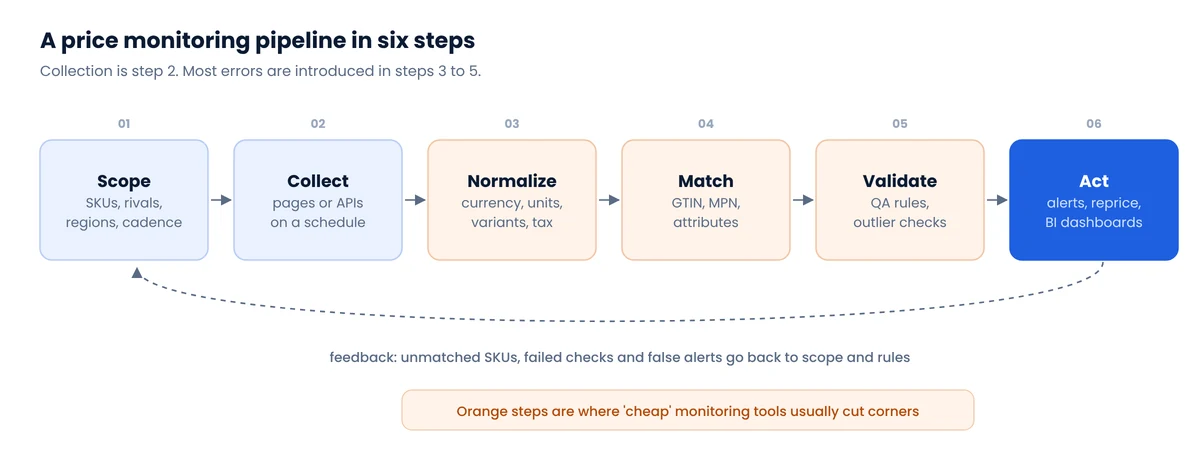
- Most errors enter during normalization and matching, not collection.
- Measure coverage, freshness and match precision every run. A dashboard without them can’t be trusted.
In this guide
1. Start with the decision the data will change
“We want to see competitor prices” is a wish, not a spec. The decision behind it determines which products, how often, and which fields. Pin it down first:
| Goal | What to track | Typical cadence | Field that matters most |
|---|---|---|---|
| Reprice your own catalog | Matched SKUs at your direct rivals | Daily to intraday | Current shelf price incl. shipping |
| MAP or reseller policy enforcement | Your brand’s products across resellers and marketplaces | Daily | Advertised price, seller name, screenshot |
| Promotion planning | Category leaders during seasonal events | Daily, hourly during events | Sale vs regular price, promo labels |
| Assortment gaps | Full catalogs of 3 to 5 competitors | Weekly | New, delisted and out-of-stock items |
| Market report or pricing study | Whole categories across many stores | One-off or monthly | Consistent context and timestamps |
If you can’t name the person who will act on an alert, you don’t need alerts yet. A weekly report may be enough.
2. Choose competitors and SKUs
The instinct is to track everything. Resist it for the first month. A useful starting scope:
- 3 to 8 competitors: the ones your customers actually compare you with, plus the marketplace where your category’s price floor is set.
- 100 to 500 SKUs: the products that drive most of your revenue or margin. Long-tail items rarely move decisions.
- One region to start, if prices differ by location.
A small scope surfaces matching and context problems while they are cheap to fix. It is also exactly the size we use for a pilot: big enough to show real price movement, small enough to verify by hand.
3. Define price context before collecting anything
A price is only comparable with a price taken in the same context. Decide and record:
- Location: store ID or ZIP. Walmart, Target and grocers price and stock by store, and they assign a store to every visitor whether you choose one or not.
- Seller: on marketplaces, the featured offer can switch sellers within hours.
- Price type: current, regular (strikethrough) and member price. Google’s merchant listing documentation treats these as distinct, and so should you.
- Shipping and fees: a $5 cheaper item with $8 shipping is not cheaper.
- Pack size and condition: a 2-pack, refurbished or open-box offer needs normalizing or excluding.
We cover the location problem, including what three big retailers assumed about our test visitor, in Zip-code pricing: why your scraped prices are wrong.
4. Collect, and decide how often
For each competitor, pick the cheapest reliable source. Official APIs where they fit (rare for competitor data), public feeds where they exist (many Shopify stores publish one, see our /products.json research), and product pages for the rest. The trade-offs are in Web scraping vs official APIs.
Cadence is where budgets go to die. More frequent is not more useful if nobody acts faster. A rule of thumb:
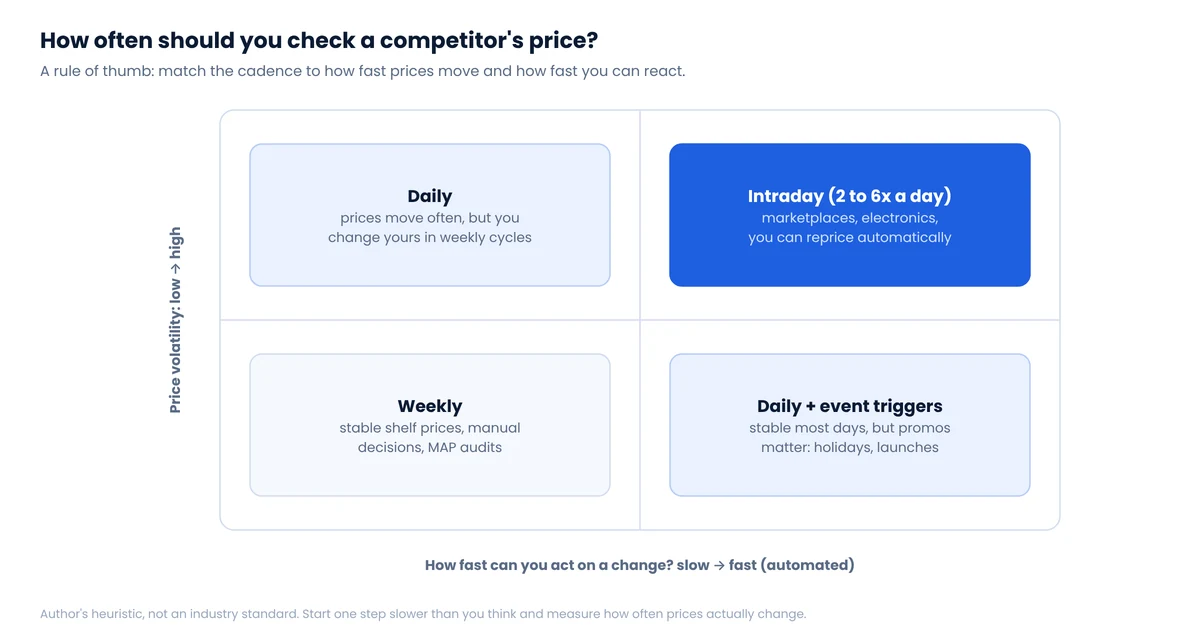
Measure it after two weeks: if fewer than 1% of your tracked prices change per day, an hourly schedule is paying for identical pages. If prices jump in the hours around promotions, add event-triggered runs rather than raising the baseline.
5. Normalize before you compare
Raw prices from different stores are rarely comparable as-is. Normalization turns them into the same unit and meaning:
- Parse safely. “$1,299.00”, “1299”, “From $49” and “2 for $30” are four different things. Keep the raw string next to the parsed number.
- Currency, if you compare across markets, with the conversion date recorded.
- Unit price for consumables: price per ounce, per count, per liter. A 24-pack at $18.99 is $0.79 per unit; the 12-pack at $10.49 is $0.87.
- Regular vs sale. Store both. In our May 2026 snapshot of the Gap.com catalog, 81.5% of products were on markdown, with an average depth of 42.9%.2 A monitor that only reads “price” would miss that the list price barely matters at Gap.
- Variants. Decide whether you compare the cheapest variant, a specific size, or every variant. Gap, for example, assigns a separate product ID per color, which we document on our Gap scraping page.
6. Match the same product across stores
Matching is the step that makes or breaks a comparison. Use identifiers when you have them (GTIN/UPC, then brand plus manufacturer part number), attribute rules to block false matches, and similarity scoring only for what’s left, with human review of low-confidence pairs. Even on curated academic benchmarks the best systems are wrong a meaningful share of the time, so plan for review. The full method, with code to validate GTINs, is in How to match products across stores.
7. Validate every run and measure quality
Each run should pass simple rules before any number reaches a dashboard: the parsed product equals the requested one, currency and location match the configuration, price is present, and a price that moved more than, say, 50% since the last observation is held for review rather than published.
Then track a few quality metrics over time. These are the ones we use; they are our working definitions, not an industry standard:
| Metric | Definition | Why it matters |
|---|---|---|
| Coverage | Share of target SKU × competitor pairs with a valid observation this cycle | Missing prices bias averages and hide moves |
| Freshness | Age of the latest valid observation per pair | A “current” price from four days ago is not current |
| Match precision | Share of sampled matches confirmed correct by review | One wrong match produces confident, false alerts |
| Context completeness | Share of observations with currency, location, seller and price type recorded | Without context, changes can’t be explained |
| Duplicate rate | Share of repeated observations for the same pair and cycle | Inflates counts and skews averages |
| Cost per valid observation | Total cost ÷ observations that passed validation | The honest unit for comparing vendors and setups |
We also recommend the five-layer view of success for each request (transport, HTTP, extraction, validity, freshness), described with a diagram in our Walmart guide.
8. Turn data into action
Data that doesn’t change a decision is a cost. Three output formats cover most needs:
- Alerts for specific events: a key competitor undercuts you by more than X% on a top SKU, a reseller advertises below MAP, a competitor goes out of stock on an item you carry. Fewer, sharper alerts get read.
- Dashboards for trends: price index vs competitors by category, share of SKUs where you’re cheapest, promo frequency.
- Repricing rules for automation: always with floors, ceilings and a human-approved rulebook.
Snapshots mislead in fast categories. One Gap item in our May dataset sold at $44.00 against an $89.95 list price; when we checked it again in September, it was $53.00. Both numbers were “the price.” Only a time series tells you which is normal.
A note on automated pricing and competition law
Watching public competitor prices and setting your own is ordinary competition. Sharing non-public pricing data with competitors, directly or through a common pricing vendor, is what attracts antitrust scrutiny, as in the US Department of Justice’s 2024 suit against rental-software company RealPage. Keep your inputs public and your rules your own.
Build, buy or outsource?
| Option | Good fit when | Watch out for |
|---|---|---|
| Self-serve price tracking software | A few hundred SKUs on popular sites, standard dashboards are enough | Matching quality, unsupported sites, little control over location |
| In-house scrapers | You have engineers and the data is core to your business | Maintenance: parsers, anti-bot, QA and matching never stop |
| Managed data service | You want clean, matched data delivered, with someone accountable for quality | Clear specs and acceptance criteria up front |
| Ready datasets | One-off research, benchmarks, model training | Freshness; check the snapshot date |
Whichever you choose, ask the vendor or your team for the quality metrics above. Anyone running a real pipeline can show coverage and match precision for last week.
A worked example: 200 SKUs, four competitors
To make the numbers concrete, here is how a modest first project sizes up. The figures are illustrative, not from a client.
- Scope: 200 SKUs × 4 competitors = 800 product pairs to match once, then re-check.
- Matching: say 150 SKUs carry a UPC that the competitors also expose, and match automatically. The other 50 go through brand plus model number and attribute checks, and 15 to 20 of those need a person to confirm. That review is a one-time cost of an hour or two, and it is where most of the trust in the final data comes from.
- Cadence: daily checks produce 800 observations a day, about 24,000 a month. Four competitors means four parsers to keep healthy.
- Quality targets: coverage above 95% of pairs per day, every observation with location and seller recorded, a weekly sample of 20 matches re-checked by hand.
- Output: one daily alert digest for undercuts on the top 50 SKUs, one weekly price-index chart per category.
After a month you will know three things you can’t know on day one: how often prices actually change, which competitors are worth watching closely, and whether the alerts change any decisions. That is the right moment to scale up or cut back.
Common mistakes we see
- Tracking 10,000 SKUs before 100 are matched correctly.
- Comparing a member price at one store with a regular price at another.
- Ignoring shipping, pack size and condition.
- Letting proxies decide the store location.
- Reporting “success rate” as HTTP 200s.
- Alerting on every change, so nobody reads alerts.
FAQ
How often should I check competitor prices?
Match cadence to how fast prices move and how fast you can react. Weekly is fine for stable categories with manual decisions; marketplaces and electronics with automated repricing may justify several checks a day. Measure the actual daily change rate after two weeks and adjust.
How many competitors should I monitor?
Start with 3 to 8: the stores your customers compare you with, plus the marketplace that sets the category’s price floor. Add more once matching and validation work reliably.
Is monitoring competitor prices legal?
Collecting publicly displayed prices is common and generally lower risk, provided you don’t log in, bypass technical barriers or overload sites. Using public prices to set your own is normal competition; sharing private pricing data with rivals is not.
What’s the hardest part of price monitoring?
Product matching and price context. Fetching pages is the easy part; making sure two prices refer to the same product, offer and location is where most errors come from.
Can I just use Google Shopping for competitor prices?
It’s a useful discovery tool, but it shows what merchants submit to Google, with its own matching and delays. For decisions, verify against the retailer’s own page in a defined location.
Notes
- Cavallo and Rigobon, “The Billion Prices Project,” Journal of Economic Perspectives, 2016. The figures describe the project’s collection by 2010 and say nothing about today’s costs or speed. ↩
- JsonEngine snapshot of the Gap.com US catalog, May 2026: 7,718 listings. Markdown share and depth change with every season. ↩
Start with a pilot, not a platform
We’ll monitor a few hundred of your SKUs against your main competitors, matched and validated, so you can judge the data before committing.
