
Insights
How to Match Products Across Stores for Price Comparison
Oct
Every price comparison rests on one assumption: that the two listings are the same thing. Get it wrong and your monitoring will report, with total confidence, that a competitor sells your 512 GB model for less than your 256 GB one. Matching is the least glamorous step in the pipeline and the one that decides whether anyone trusts the output.
Key takeaways
- Match products first, compare offers second. A GTIN identifies a product; price, seller, condition and pack size belong to the offer.
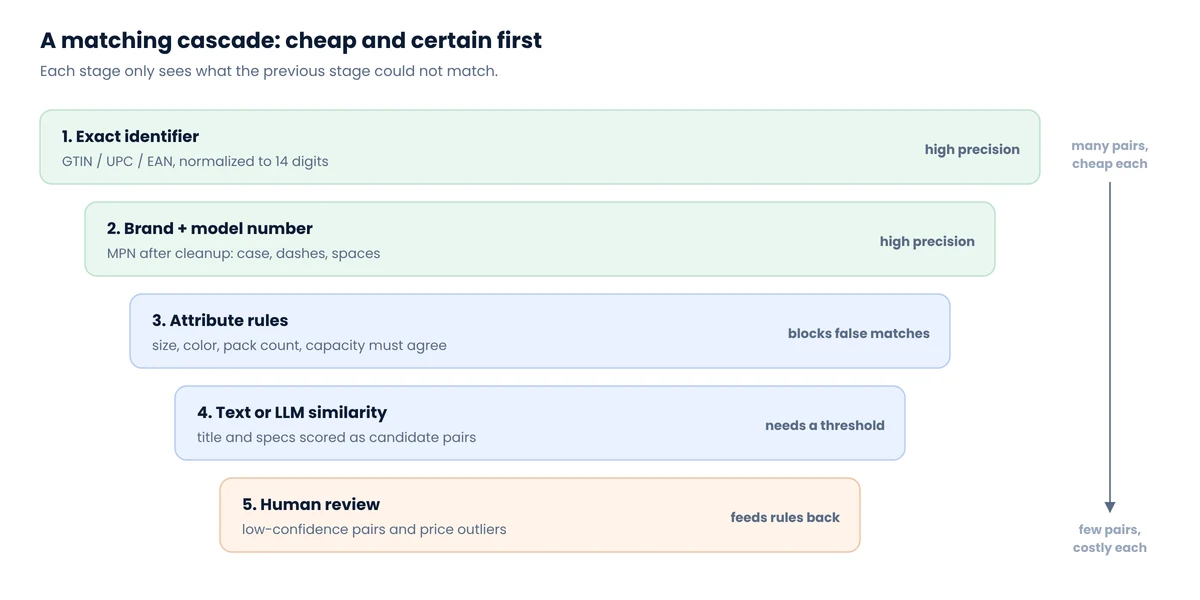
- Run a cascade: exact identifiers, then brand + model number, then attribute rules, then similarity scoring, then human review.
- Attribute “veto” rules (capacity, size, pack count) prevent more costly errors than any model.
- On the WDC Products benchmark, best published systems score between 0.64 and 0.89 F1 depending on difficulty. Plan for review, not perfection.
- For price monitoring, precision beats recall: a missed match leaves a gap, a false match sends a false alert.
Products and offers are different things
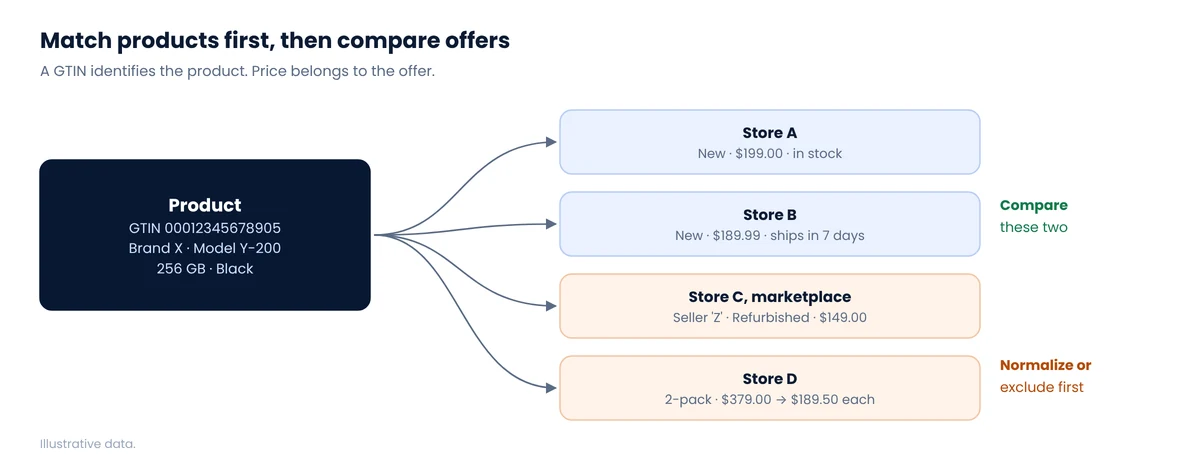
GS1 defines the GTIN as the identifier for a trade item: the barcode number on the box, whether it’s printed as a 12-digit UPC in the US or a 13-digit EAN elsewhere. One GTIN, one product. The same product then appears as many offers: new at one store, refurbished from a marketplace seller at another, in a 2-pack at a third. Matching answers “same product?”; offer rules answer “comparable price?” Keep the two questions separate in code and in your data model.
Why matching is harder than it looks
- Identifiers are often missing. Many store pages don’t show a UPC, and some feeds omit it entirely; Shopify’s public
/products.json, for example, has SKUs but no barcode field, as we found in our test of 50 Shopify stores. - Variants are modeled differently. Gap gives each color its own product ID, as we found when collecting the Gap catalog. IKEA also treats colors as separate products. Another store may hold all colors under one product with variants. You have to match at the right level.
- Titles are marketing. “Ultra-Soft 3-Pack Crew Tee” and “Men’s Crewneck T-Shirt (3 Pack)” may be identical; “Pro” and “Pro Max” are not.
- Near-duplicates are everywhere. Model years, regional versions, retailer-exclusive bundles and renewed items share most of their words with the original.
A five-stage matching cascade
Stage 1: exact identifiers, validated
Normalize every GTIN to 14 digits and validate its check digit before trusting it. Scraped identifiers are frequently truncated, padded wrongly or copied from the wrong field; a check-digit test catches most of that for free.
Python: normalize and validate a GTIN / UPC / EANdef gtin14(raw: str) -> str | None:
digits = "".join(ch for ch in str(raw) if ch.isdigit())
if len(digits) not in (8, 12, 13, 14):
return None
g = digits.zfill(14)
body, check = g[:-1], int(g[-1])
# weights 3,1,3,1... from the rightmost body digit
total = sum(int(d) * (3 if i % 2 == 0 else 1) for i, d in enumerate(reversed(body)))
return g if (10 - total % 10) % 10 == check else None
assert gtin14("012345678905") == "00012345678905" # valid UPC-A
assert gtin14("012345678904") is None # bad check digit
Two listings with the same valid GTIN are the same product with very high confidence. Not certainty: some sellers reuse codes, and some brands keep a GTIN across minor revisions. That’s what the later stages and spot checks are for.
Stage 2: brand plus manufacturer part number
When GTINs are missing, the manufacturer part number (MPN) or model number is the next best key, but only after normalization: uppercase, strip spaces, dashes and slashes, and map brand aliases (“HP” and “Hewlett-Packard,” “LG Electronics” and “LG”). Match on the pair, never on the MPN alone, since short model numbers collide across brands.
Stage 3: attribute rules that veto
Before any fuzzy matching, extract the attributes that make two near-identical titles different products, and refuse a match when they conflict:
| Attribute | Example conflict | Typical source |
|---|---|---|
| Capacity / size | 256 GB vs 512 GB; 12 oz vs 16 oz | Title, specs table |
| Pack count | Single vs 2-pack vs 12-count | Title, “count” field |
| Color / finish | Black vs Midnight (may be the same, check a map) | Variant options |
| Model generation | “(2nd Gen)” vs “(3rd Gen)”, “2025” vs “2026” | Title |
| Condition | New vs refurbished vs open box | Offer, seller name |
Veto rules are cheap, explainable and catch the matches that hurt most in price monitoring, because a wrong capacity or pack size produces a big, convincing, fake price gap.
Stage 4: text and LLM similarity, on candidates only
What’s left needs judgment. Don’t compare every product with every other; generate a few candidates per item first (same brand, overlapping title words, similar price), then score each candidate pair. Scoring can be classic string similarity, an embedding model, a fine-tuned matcher, or a large language model asked “same product: yes or no, and why.”
LLMs have become surprisingly good at this. In a study by Ralph Peeters, Aaron Steiner and Christian Bizer at the University of Mannheim, GPT-4 without any task-specific training outperformed matchers fine-tuned on thousands of examples on the hardest product benchmark:
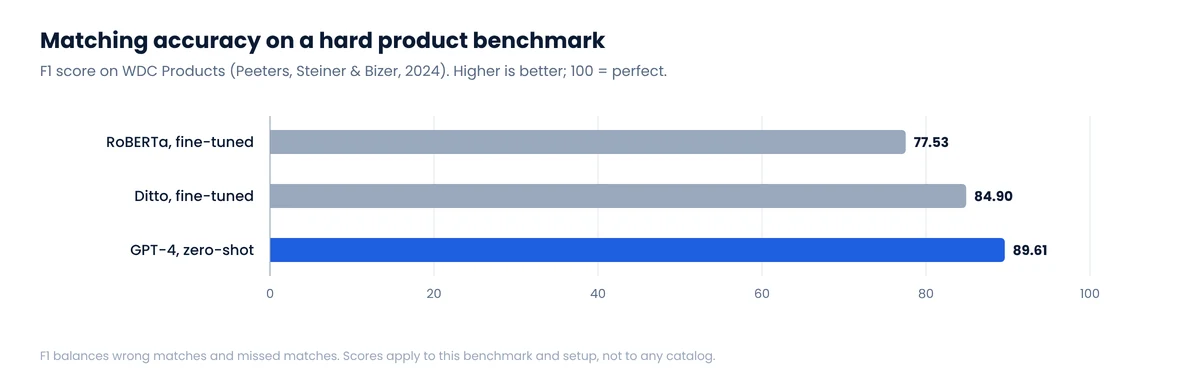
Treat those numbers carefully. F1 is the balance between precision (how many predicted matches are right) and recall (how many true matches were found); it is not “89% accuracy” on your catalog. And LLM calls cost money and time per pair, which is exactly why they belong at stage 4, on the small remainder, not at stage 1.
Stage 5: human review of the uncertain
Send low-confidence pairs and any match that implies an extreme price gap to a person. A few hundred reviews at the start of a project are cheap; every reviewed decision should also improve the rules, for example a new brand alias or a new veto attribute.
What the benchmarks say about difficulty
The WDC Products benchmark from the University of Mannheim is built from 11,715 product offers describing 2,162 products, collected from 3,259 online shops. It comes in 27 variants that vary how many “corner cases” (near-identical but different products) appear and whether test products were seen in training. Across those variants, the best systems in the benchmark paper scored F1 from 0.64 to 0.89.1 The spread is the point: difficulty depends more on how similar your non-matching products are than on which model you pick.
Measuring your own match quality
- Sample and review. Every week, take 20 to 50 random accepted matches and check them by hand. Precision from that sample is the number to report.
- Favor precision. In price monitoring, a missed match leaves a gap; a false match triggers a false alert and erodes trust. Set thresholds accordingly.
- Classify errors. Variant level, pack size, model generation, condition, wrong brand. Each category usually points to one missing rule.
- Re-match on change. Products get new titles and new variants. Re-run matching on items whose attributes changed, not only on new items.
Matching is step 6 of the eight in our competitor price monitoring guide, and in our experience it’s where most monitoring projects that “didn’t work” actually failed. It’s also why every price monitoring project we run starts with a matched pilot set reviewed together with the client.
FAQ
What is the best way to match products across stores?
A cascade: exact GTIN or UPC match, then brand plus model number, then attribute rules that veto conflicting capacity, size or pack count, then similarity scoring on remaining candidates, and human review for uncertain pairs.
Can I match products by title alone?
Only as a last resort, and only with attribute checks. Titles differ across stores for the same product and are nearly identical for different ones, such as two storage sizes of the same phone.
Are LLMs good at product matching?
On research benchmarks, yes: GPT-4 zero-shot reached an F1 of 89.61 on WDC Products, above fine-tuned matchers. They are slower and costlier per pair, so use them on the hard remainder after cheaper rules.
What is a GTIN check digit?
The last digit of a GTIN, computed from the others. Validating it catches most typos and truncated codes before they create false matches.
Notes
- Peeters, Der and Bizer, “WDC Products: A Multi-Dimensional Entity Matching Benchmark” (2023/2024). F1 ranges refer to pair-wise matching systems evaluated in the paper. ↩
Need matched data, not just scraped data?
We deliver competitor prices already matched to your SKUs, with the match method and confidence on every row.
